---
title: Create a `Makefile`
author: Franklin Bristow
---
Create a `Makefile`
===================
::: outcomes
* [X] Create a `Makefile` to accomplish a task (building software, running
commands).
:::
Dependency management in Python is straightforward with `pip`. While people do
distribute Python programs to other people to install on their computers, most
of the time we're not *compiling* Python programs.
We're going to switch now to taking a look at building software (compiling
source code into a runnable program), specifically in the context of building C
programs.
There are many approaches to building C programs, and we've seen at least one
way to do that in this course:
```bash
clang my-app.c -o my-app # compile my-app.c
```
This is fine when our program is exactly one file big, but as you design and
grow your software, you're very quickly going to find that single-file programs
become unwieldy.
::: aside
I'm not saying you *can't* have a single file that's got thousands of lines of
code, but I am saying that it's a "bad idea"™.
:::
In practice you're probably going to be [decomposing] your application and problem
into smaller functional units (you're going to have your `main` function in one
file, your `gui` code in a bunch of files in a separate folder, your data
structures in individual files, ...).
You certainly *can* still compile these one at a time, but managing the
dependencies between different units quickly gets painful (and tedious):
```bash
clang list.c -c -o list.o
clang set.c -c -o set.o
clang my-app.c list.o set.o -o my-app
### Did I remember to re-compile everything?
```
[decomposing]: https://en.wikipedia.org/wiki/Decomposition_(computer_science)
What even is `make`?
--------------------
[`make`] is a program that can help you with situations like this: You tell it
what things you're trying to compile, how to compile those things, and what each
unit depends on, and `make` will figure out the correct order of commands to run
to make sure that you're able to get your program out at the end.
::: aside
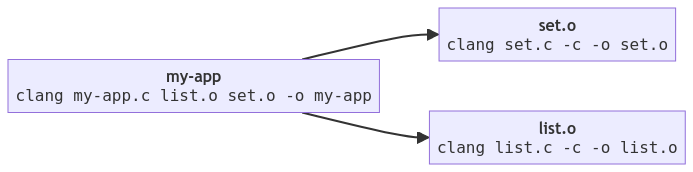
`make` is going through the process of building a [dependency graph]: a set of
nodes and directed edges $G = (V, E)$, where the nodes are the compiled outputs
and the instructions for creating them, and the directed edges are the way that
one compiled output depends on the existence of another compiled output.
In the example we had above (`list.o`, `set.o`, and `my-app`), the dependency
graph would look something like this:
[dependency graph]: https://en.wikipedia.org/wiki/Dependency_graph
:::
We fortunately don't have to draw a graph for `make` to create this graph.
Instead, we list out "targets" (the things we're trying to build), their
dependencies (what this unit depends on), and the commands `make` should use to
create that target. This all goes into a special file named `Makefile`.
[`make`]: https://en.wikipedia.org/wiki/Make_(software)
Running `make`
--------------
Re-download or copy `hello.tar.gz`:
https://university-of-manitoba-computer-science.github.io/tools-n-techniques/topic07/hello.tar.gz
If you're downloading this file again, you should extract it:
```bash
tar -xf hello.tar.gz
```
The folder `hello` has a file named `Makefile`. You can run the command `make`
in this directory to build the targets:
```bash
cd hello
make
```
`make` works by looking for a file in the current working directory that has a
special name, [usually `Makefile`] with an upper-case `M`. By default, `make`
will find the first "target" in the file (the first thing that appears on the
left side of a colon `:`). In `hello`, the first line in the `Makefile` that
matches this looks like:
```makefile
all: HelloWorld.class hello ccrash
```
Our first "target" here is listing out all of the things we want to build in
this `Makefile` as a "dependency". This target is often called `all`, but this
is also a "de facto" standard, you can also call this first target `cats` and
`make` will behave the same way.
Assuming that everything's working, you should see output similar to the
following:
```bash
[you@bird hello]> make
javac HelloWorld.java
clang -Wall -Wpedantic -Wextra -Werror -g hello.c -o hello
clang -Wall -Wpedantic -Wextra -Werror -g ccrash.c -o ccrash
```
This `Makefile` has a `clean` target, this is another "de facto" standard for a
target name that doesn't create anything new but deletes outputs from compilers:
```bash
make clean
```
You can also ask `make` to build a specific target by specifying the target name
after `make`:
```bash
make hello
```
[usually `Makefile`]:
https://www.gnu.org/software/make/manual/html_node/Makefile-Names.html
Format of a `Makefile`
----------------------
Let's take a look at what `Makefile`s look like in more detail. The `Makefile`
in `hello` is slightly more complicated and we'll see all of it soon, but the
simplest format for a `Makefile` is straightforward:
```makefile
target: dependencies
commands
```
This is a **rule**, and the rule consists of a **target**, the target's
**dependencies**, and a **sequence of 0 or more commands** that can be used to
transform the dependencies into the target.
Whatever your stance is on [tabs vs spaces], `make` doesn't care what you think:
the whitespace before the `commands` **must** be a Tab (it cannot be
spaces). Thankfully most text editors are aware of this, and when you create or
open a file named `Makefile`, they will very helpfully put tabs in instead of
spaces.
::: example
Here's the `Makefile` for our imaginary program above:
```makefile
set.o: set.c # set.o depends on set.c
clang set.c -c -o set.o
list.o: list.c
clang list.c -c -o list.o
my-app: my-app.c list.o set.o
clang my-app.c list.o set.o -o my-app
```
:::
Here are some general [rules of thumb]:
* The dependencies listed on the right side of the `:` should generally include
your source code (`.c`, `.java`, `.py`).
* The targets listed on the left side of the `:` are always going to be what
your compiler produces as output (`.class`, `.o`).
* The commands should take as input the dependencies, and produce as output the
target.
[tabs vs spaces]:
https://softwareengineering.stackexchange.com/questions/57/tabs-versus-spaces-what-is-the-proper-indentation-character-for-everything-in-e
[rules of thumb]: https://en.wikipedia.org/wiki/Rule_of_thumb
### Variables
Similar to shell scripts, `Makefile`s can also use [variables]. We're going to
look at a specific kind of variable that can be used in rules to help make sure
we don't have to name targets and dependencies in our list of commands:
[automatic variables]. Here are some of the automatic variables you can use in
commands to generate a target from its dependencies:
+--------------------+-------------------------------------+
| Automatic variable | Description |
+====================+=====================================+
| `$@` | The target's file name. |
+--------------------+-------------------------------------+
| `$<` | The name of the *first* dependency. |
+--------------------+-------------------------------------+
| `$^` | The name of *all* dependencies. |
+--------------------+-------------------------------------+
::: example
Let's convert the `Makefile` above for our imaginary program to use these
variables:
```makefile
set.o: set.c
clang $< -c -o $@
list.o: list.c
clang $< -c -o $@
my-app: my-app.c list.o set.o
clang $^ -o $@
```
:::
While this isn't necessarily any easier to read, it does make sure that you're
including both the dependencies and the targets in the commands used to
transform the dependencies *into* the targets.
::: challenge
Convert the `Makefile` from `hello` to use these [automatic variables].
There's only one target specified (`HelloWorld.class`), so that's the only one
to change.
:::
[variables]:
https://www.gnu.org/software/make/manual/html_node/Using-Variables.html
[automatic variables]:
https://www.gnu.org/software/make/manual/html_node/Automatic-Variables.html
Using GNU Make to build C programs
----------------------------------
You might have noticed that the `Makefile` in `hello` looks, uh, a little weird:
* It clearly compiles some C programs when you run `make`.
* The names of the C programs are listed as a dependency in the `all` target.
* There are no `clang` commands in this `Makefile` at all.
What gives?
[GNU Make] knows a lot about C programs (and other languages) in the form of
[implicit rules]. One of the implicit rules that GNU Make has is for C programs:
```makefile
LINK.c = $(CC) $(CFLAGS) $(CPPFLAGS) $(LDFLAGS) $(TARGET_ARCH)
%: %.c
$(LINK.c) $^ $(LOADLIBES) $(LDLIBS) -o $@
```
There's a bunch of unusual looking stuff here, but it's straightforward:
* `LINK.c` is a variable definition, and it's a string that gets built up by
evaluating many other variables (`CC`, `CFLAGS`, `CPPFLAGS`, ...).
* `%: %.c` is a target/dependency pair. The `%` is a *wildcard*, matching
anything on the left as a target that has a matching dependency on the right
with an extension of `.c` (this is what matches `hello` and `hello.c` in our
`Makefile`).
* The command to build the target is a bunch of other variables, some of which
we've seen (`$^` and `$@`).
Let's look at these side-by-side:
:::::: columns
::: {.column width=45%}
### The implicit rules and variables in GNU Make
```makefile
LINK.c = $(CC) $(CFLAGS) $(CPPFLAGS) $(LDFLAGS) $(TARGET_ARCH)
%: %.c
$(LINK.c) $^ $(LOADLIBES) $(LDLIBS) -o $@
```
:::
::: {.column width=45%}
### Our `Makefile`
```makefile
CC = clang
CFLAGS = -Wall -Wpedantic -Wextra -Werror -g
all: hello
```
:::
::::::
While these two rule sets aren't literally part of the same file, you can
imagine that the rules and variables on the left (the stuff that's defined in
GNU Make) come first, and the rules and variables on the right (the stuff that's
defined in our `Makefile`) come after:
```makefile
LINK.c = $(CC) $(CFLAGS) $(CPPFLAGS) $(LDFLAGS) $(TARGET_ARCH)
%: %.c
$(LINK.c) $^ $(LOADLIBES) $(LDLIBS) -o $@
CC = clang
CFLAGS = -Wall -Wpedantic -Wextra -Werror -g
all: hello
```
Variables that don't have values will eventually turn into empty strings, and
variables that have values (even if they're declared and defined later in the
file) will be replace with the values that they're given.
Let's step through this:
1. The first rule that has an actual target is our `all` target, so that's the
first thing that's evaluated. `all` depends on `hello`.
2. `hello` then matches `%: %c`; it matches the wildcard as a target on the left
specifically because there is a file named `hello.c` in this directory (the
dependency is satisfied).
3. The command for transforming `hello.c` (the dependency) into `hello` (the
target) consists almost entirely of variables (everything *except* `-o`), but
`$(LINK.c)` uses `$(CC)` (which we defined as `clang`) and `$(CFLAGS)` (which
we defined as `-Wall...`), and uses the special variable `$^` (all
dependencies).
4. The command turns into:
```bash
clang -Wall -Wpedantic -Wextra -Werror -g hello.c -o hello
```
(the extra spaces between `-g` and `hello.c` are the spaces in the variable
`LINK.c` between the other variables, the spaces between `hello.c` and `-o`
are from the empty variables between `$^` and `-o`).
Neat :camera:.
[GNU Make]: https://www.gnu.org/software/make/
[implicit rules]:
https://www.gnu.org/software/make/manual/make.html#Catalogue-of-Rules
Using `make` to build... stuff
------------------------------
`make` is great at building code, but `make` isn't just about building code,
it's about identifying **targets** and satisfying their **dependencies** by
running **commands**.
Let's walk through an example of using `make` to do *other* stuff, like
converting files from one format to another. Gosh. That sounds like something
we've done before...
Right, let's use `make` to convert files from Markdown to other formats like
`pdf` or `html`.
Here's a Markdown-formatted document that you can place into your current
working directory:
```markdown
Hello!
======
I'm a Markdown formatted file. We can write about
* Numbers and formulas $\frac{1}{2}$,
* Code: `System.out.println`
* Or *whatever*.
```
Copy this into a file named `hello.md` in a directory *somewhere*.
Now create a new file named `Makefile`; let's step through writing it together:
1. We need to have a target for `all`, and we want that rule to be first. So let's
add an `all` target. We'll focus for now on converting our Markdown file to
HTML.
```makefile
all: hello.html
```
2. Now we need to add a target for `hello.html` --- `make` doesn't know how to
convert `.md` to `.html` in the same way it does `.c` to a compiled program,
so let's do that. We want to add a target that matches specifically
`hello.html` (we'll get fancier later, let's keep it simple for now).
`hello.html` depends on `hello.md` (we're transforming `hello.md` into
`hello.html`).
```makefile
all: hello.html
hello.html: hello.md
```
3. Once we've got a target, we need to tell `make` how to do that
transformation. Beneath our target for `hello.html`, let's add a command to
convert it:
```makefile
all: hello.html
hello.html: hello.md
pandoc hello.md --standalone -o hello.html
```
Now run `make` in your directory, and `make` should transform `hello.md` into
`hello.html` using `pandoc`. Nice :tada:!
Now the important bit: make changes to `hello.md` and re-run `make`. `make` will
detect changes in the file (the modified date in the dependency is newer than
the created date on the target) and will automatically figure out which
dependencies need to be rebuilt.
Neat :camera:.
Let's use what we've learned to try and turn this into something that can do
what we did with shell scripting:
1. Let's switch our command to use the built-in variables for the names of
targets `$@` and dependencies `$<`:
```makefile
all: hello.html
hello.html: hello.md
pandoc $< --standalone -o $@
```
2. We don't want to give specific names for targets (or dependencies), so let's
use wildcards:
```makefile
all: hello.html
%.html: %.md
pandoc $< --standalone -o $@
```
3. We don't want to list out the targets for `all`, we can use the [wildcard
function]:
```makefile
MD = $(wildcard *.md)
all: $(MD:md=html) # use the value of MD, but replace `md` with `html`
%.html: %.md
pandoc $< --standalone -o $@
```
Now you can add more Markdown files to this directory with any name and the
files will be converted to HTML.
::: challenge
Look further at having this work for nested directories (you'll have to spend
some more time looking at wildcards), and have this work for multiple formats of
output (either by making new targets with new extensions, or by [accepting
variable arguments to `make`]).
[accepting variable arguments to `make`]:
https://www.gnu.org/software/make/manual/html_node/Overriding.html
:::
[wildcard function]:
https://www.gnu.org/software/make/manual/html_node/Wildcard-Function.html
Running `make` concurrently
---------------------------
One final and minor thing to add is that `make` can try to build targets that
are unrelated *concurrently*. Your computer has a processor with more than one
core, and each core can be used by `make` to build unrelated dependencies for
targets.
Here's the dependency graph we had from above:

When `make` builds `set.o` and `list.o`, it can build them literally at the same
time because they don't have common dependencies.
We can tell `make` to run on multiple CPUs using the option `-j` for **j**obs.
::: example
You can pass `-j` to `make` for *any* `Makefile`, and if `make` identifies
targets it can build independently of other targets, it will do that!
```bash
make -j10 # run 10 jobs concurrently (if possible)
```
This is helpful when you're building things that aren't trivial, or if you're
using `make` to transform files from one format to another where that
transformation is expensive (e.g., converting audio or video from one format to
another, converting images between formats).
::: warning
Don't set `-j` higher than the number of CPUs you have installed on the system.
A command you can use to find out how many CPUs you have installed on a Linux
system is `nproc`, and you can use that in conjunction with `make`:
```bash
make -j$(nproc)
```
:::
:::
Further reading
---------------
There's a lot here, and we're just barely scratching the surface. You can find
more information about `make` in a few different places:
* If you really just want a place where you can quickly find, copy, and paste a
`Makefile` that will work for the situation that you want, or if you're
looking for a more in depth tutorial on how to build a `Makefile`, look no
further than .
* The [GNU Make documentation] is... comprehensive, it's about 1MB (or one
million characters) of documentation about how to use `make`. It's a lot, but
if you have a question, you can almost certainly find the answer there.
[GNU Make documentation]: https://www.gnu.org/software/make/manual/